Track your GitHub Copilot spend, locally.
Tokenyst tracks your GitHub Copilot Chat and CLI usage, estimates token costs, and watches your combined spend against a monthly budget — all from a VS Code sidebar and the status bar. No account, no network requests, no data leaves your machine.
Free & open source (MIT) · No dependencies
Everything you need to watch your Copilot budget
Two sources, one budget — Copilot Chat and the Copilot CLI combined into a single monthly total, matching GitHub's usage-based billing.
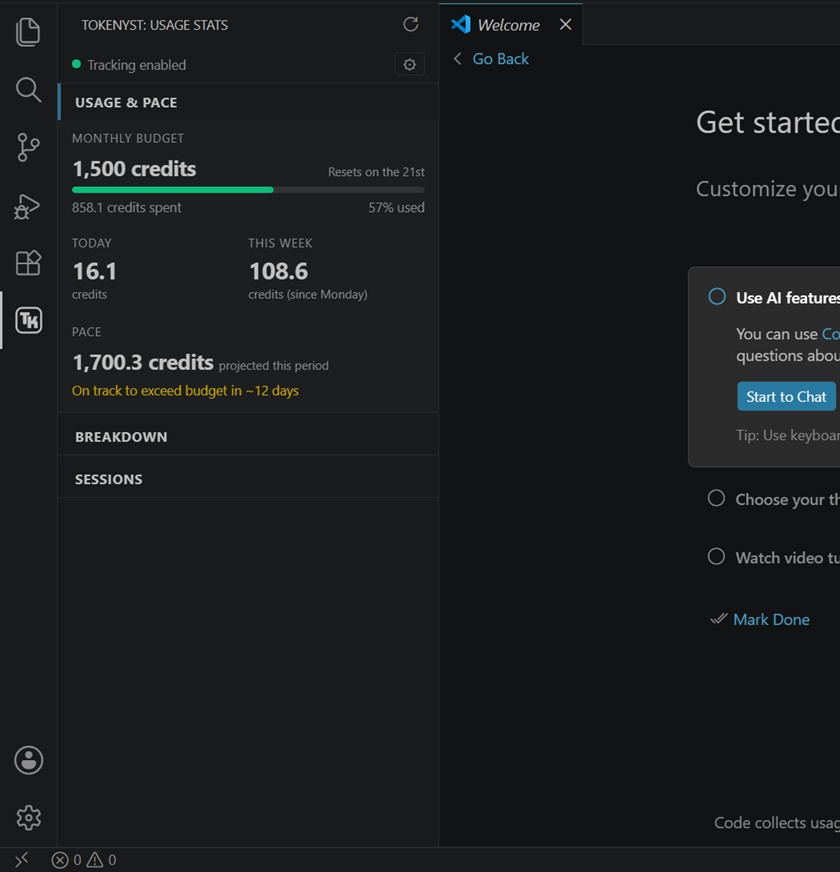
Usage Stats panel
A dedicated sidebar view: a monthly budget card (spend vs. cap), Today / This Week KPIs with a period filter, and a pace projection for the current billing period.
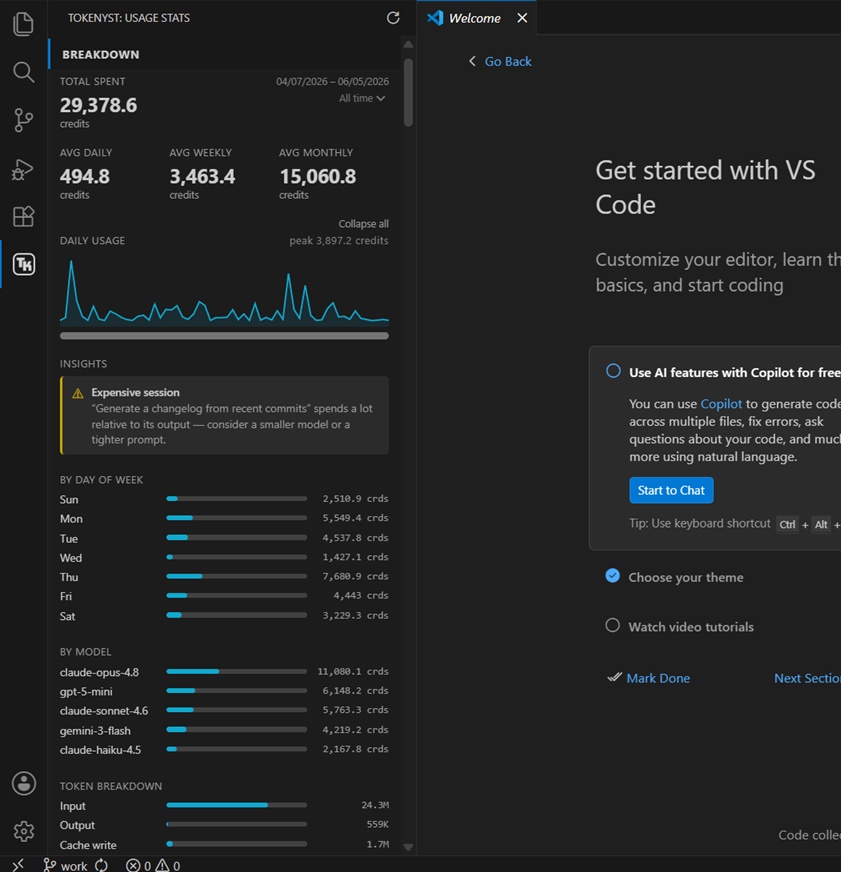
Rich breakdowns
Foldable breakdowns by day of week, model, token type (input / output / cache with a cache-reuse %), source (Chat vs CLI), and repo — each collapsible individually.
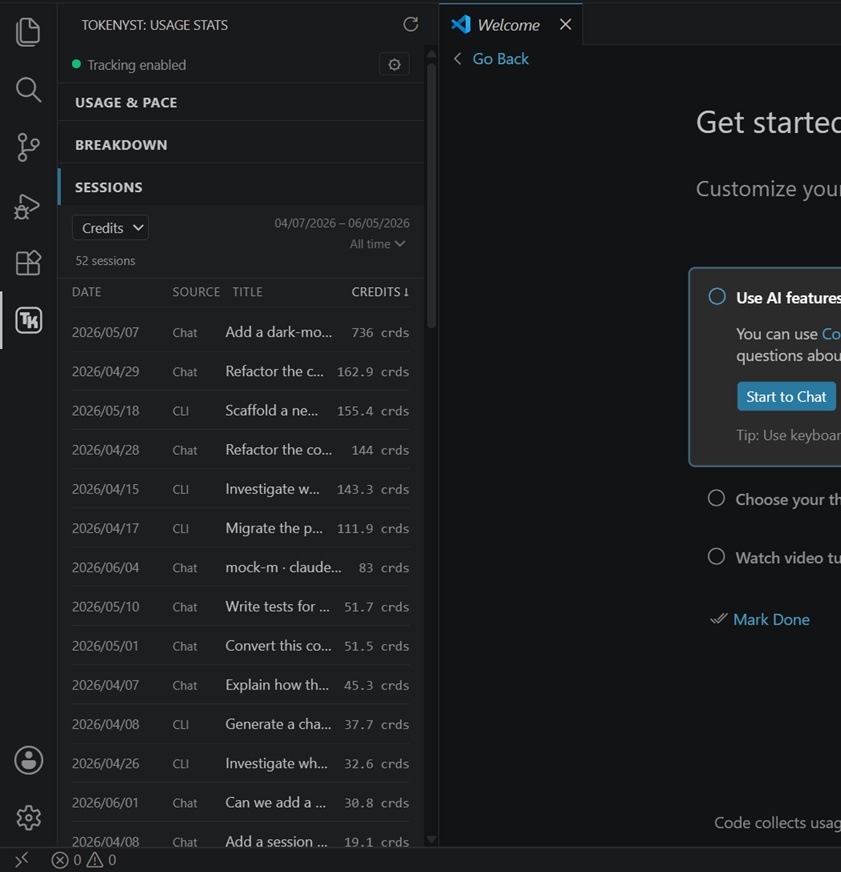
Session breakdown
A sortable list of individual Chat and CLI sessions, each titled by its first prompt, so you can pinpoint your most expensive sessions and expand a per-session detail view.
Optimization insights
Automatic, colour-coded tips from your usage patterns: low cache reuse, model and repo hotspots, and expensive-but-low-output sessions.
Real costs, not guesses
Tokenyst uses the actual credit cost GitHub records — per-request credits for Chat, reported AI Credits for the CLI — and only falls back to a token estimate when no credit value exists.
Status bar indicator
A live readout of credits spent this period, right in the VS Code status bar — toggle between Today and This Period at a glance.
Budget periods
Calendar month by default, or anchored to your plan's renewal day. Pick a Copilot tier preset (Pro, Business, Pro+/Enterprise) or enter a custom monthly cap.
Historical import
Backfill your stats from existing Copilot session history, so your dashboard is populated from day one.
Manual allocations
Add custom allocations from the UI with a credit amount, model name, and optional repo — and remove them again from a picker list.
How it works
Tokenyst reads from two local sources and combines them into one budget. Nothing is sent to any server.
-
The VS Code Copilot Chat extension records each chat session under your
workspaceStorage. - Tokenyst watches those files and aggregates usage per session and model, reading the real token counts Copilot records on each completed request.
- Input counts are context-inclusive (system prompt, tool definitions, attached files, history) — they reflect what Copilot actually sends.
-
The GitHub Copilot CLI records each session under
~/.copilot/session-state/. - Tokenyst reads the real AI-credit cost the CLI records for each model — the same AI Credits the CLI prints when it exits — so CLI spend matches GitHub exactly.
- Token counts are kept for transparency. Where no credit value exists, costs fall back to a baked-in token pricing table.
All usage is stored as allocations in a single
~/.tokenyst/config.json
file on your machine.
See it in action
A look at the Usage Stats panel, breakdowns, and the sortable session list. Motion demos are on the way.
Your data stays on your machine
Tokenyst makes no network requests and has
no external dependencies. It reads only local
Copilot session files and writes only to ~/.tokenyst/.
What it stores
- Your budget, renewal day, and recorded usage allocations
- An optional local debug log (only when enabled)
What it reads
- VS Code Copilot Chat session files (written by the Copilot Chat extension)
- Copilot CLI session logs (written by the Copilot CLI)
Pricing data is baked into the extension — no pricing or billing service is contacted.
Get started in a minute
-
1
Install Tokenyst from the VS Code Marketplace.
-
2
Open the Tokenyst view from the activity bar.
-
3
Run Tokenyst: Enable Copilot Tracking — it checks for Chat & CLI sessions and offers to import history.
-
4
Run Tokenyst: Set Monthly Budget — pick a Copilot tier preset or a custom amount.
-
5
Optional: Run Set Renewal Date if your plan renews on a day other than the 1st.
Requires VS Code 1.85+ and GitHub Copilot Chat and/or the GitHub Copilot CLI.